
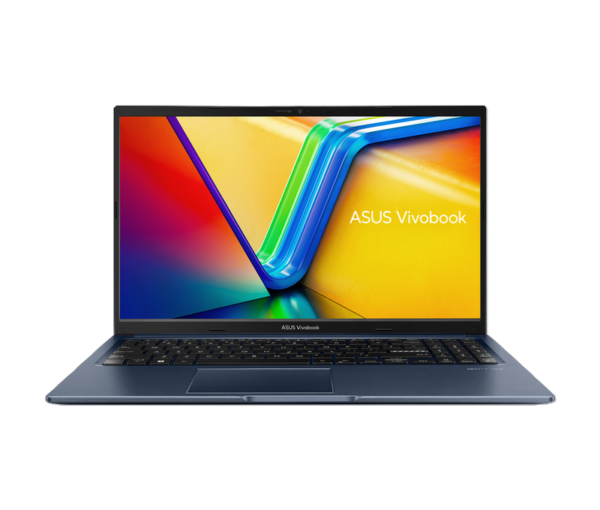
💻ASUS Vivobook 15 Intel Core i5 13th Gen 13420H
The ASUS Vivobook 15 with Intel Core i5-13420H is a mid-range notebook designed to balance everyday productivity with capable performance. Positioned as a versatile laptop for students, professionals, and light creators, it combines a 13th-generation Intel H-series processor with a roomy 15.6″ Full HD display, generous RAM and storage, and Windows 11 with Microsoft Office to give users a ready-to-use computing experience.
⚙️ Specifications at a Glance
Here’s the core hardware that defines this Vivobook:
- Processor: Intel Core i5-13420H (8 cores / 12 threads, up to ~4.6 GHz)
- Memory: 16 GB DDR4 RAM (expandable in some configurations)
- Storage: 512 GB M.2 NVMe PCIe 4.0 SSD
- Graphics: Intel UHD (integrated)
- Display: 15.6″ FHD (1920 × 1080), 60 Hz, ~250 nits brightness
- Operating System: Windows 11 Home + Microsoft 365 Basic (1 yr) + Office Home 2024
- Ports: USB Type-C, USB 3.2, USB 2.0, HDMI, audio jack
- Battery: ~42 Wh, 3-cell Li-ion
- Weight: ~1.70 kg
- Camera: 720p HD with privacy shutter
These specs underline a machine built for smooth multitasking, fast storage access, and solid day-to-day performance.
🔄 What’s Different from Its Predecessors
Compared to earlier Vivobook 15 models (such as those with lower-tier CPUs like the Core i5-1335U), this version brings several meaningful upgrades:
- Stronger CPU: The Core i5-13420H (H-series) delivers more sustained performance, especially in threaded workloads, thanks to higher power headroom than the U-series chips seen before.
- Faster Storage Interface: PCIe 4.0 SSD support enables quicker read/write speeds than older PCIe 3.0 drives, improving boot and app load times.
- More RAM: 16 GB DDR4 (often higher than budget predecessors) aids responsiveness in multitasking and larger datasets.
- Modern Connectivity: Wi-Fi 6E support in some configurations offers future-friendly network performance.
These refinements signal a shift from basic everyday laptops to more capable machines that can handle heavier productivity tasks.
✨ Standout New Features
While mostly evolutionary rather than revolutionary, the Vivobook 15 brings useful enhancements:
- Backlit chiclet keyboard with a num-pad on select models for easier typing in dim light.
- Wi-Fi 6E for improved wireless bandwidth on supported networks.
- Office + Cloud Software Bundles pre-installed, saving extra purchase cost.
- Precision touchpad and ergonomic design that make long typing sessions more comfortable.
These features may not be groundbreaking, but they add noticeable polish in everyday use.
🧑💻 The Day-to-Day User Experience
Users generally report that the Vivobook feels snappy for most non-gaming tasks thanks to the powerful i5 chipset and fast SSD. Boot times are quick, Windows feels fluid under light to moderate workloads, and the screen provides decent clarity for web browsing, video streaming, and productivity.
However, a few consistent themes emerge in feedback:
- Battery life is mixed: Some find the battery adequate for a few hours of use, while others say it depletes quickly under heavier tasks.
- Heating and thermals: The powerful H-series processor in a slim chassis sometimes runs warm under load, which is typical but noticeable.
- Build quality concerns: A number of users have reported issues with hinge durability, though others don’t experience this problem.
Owners also like the keyboard layout and overall portability, though they acknowledge trade-offs around thermals and battery.
🎮 High-End Gaming
With only integrated Intel UHD graphics, the Vivobook 15 isn’t designed for demanding AAA titles. Light and older games might run at low settings, but graphically intensive games will exceed its capability. This makes it unsuitable as a dedicated gaming laptop.
🧠 CPU-Intensive Work (3D Modeling / Rendering)
The Core i5-13420H provides strong multicore performance for its class, so it can handle some CPU-heavy apps like basic 3D modeling and rendering. Still, for professional 3D workflows or high-resolution renders, a machine with a dedicated GPU and higher thermal headroom would be a better fit.
📊 Office and Productivity
This is where the Vivobook 15 shines: spreadsheets, documents, web research, video calls, and multitasking are handled well. The inclusion of Microsoft Office and comfortable keyboard encourage productivity right out of the box.
⭐ Customer Reviews
Actual owner feedback paints a nuanced picture:
👍 Pros
- Customers appreciate the display quality and performance responsiveness.
- Many consider it good value for everyday work and study.
- Some users praise the smooth multitasking and inclusion of Office tools.
👎 Cons
- Several users report battery drains faster than expected under load.
- Build quality concerns, especially with the hinges, appear frequently in reviews.
- Others mention heat and fan noise during sustained use.
Owners also debate topics like Linux compatibility and long-term durability, sometimes noting that service experiences vary widely.
💡Conclusion
The ASUS Vivobook 15 with Intel Core i5-13420H is a compelling choice for users seeking a strong daily driver with solid performance for productivity, web use, and casual creative tasks. It’s less appropriate for high-end gaming or professional rendering but stands out in its price segment for overall balance.
If you prioritize everyday responsiveness and software productivity or want a dependable laptop for study/work, this Vivobook delivers. Just be mindful of potential battery, thermal, and build-quality issues as noted by some customers in real-world use.
Reviews
There are no reviews yet.