
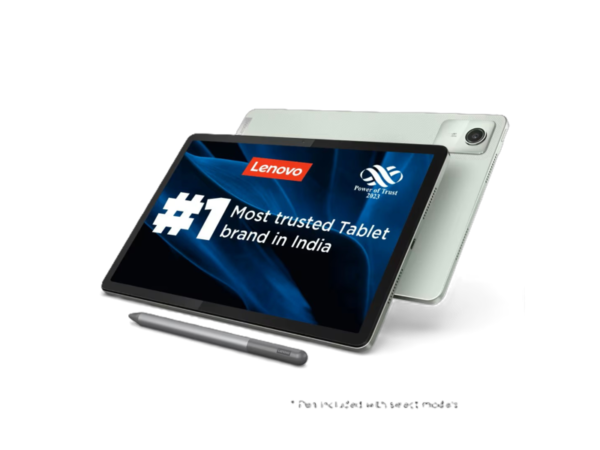
📱Lenovo Tab M11 — A Comprehensive Look
The Lenovo Tab M11 is a mid-range Android tablet aimed at users who want a balance of productivity, entertainment, and mobility without spending a premium. It sports a large 11-inch Full HD+ display and is built for everyday performance — from streaming and browsing to note-taking — while also offering long battery life and versatile software features.
⚙️ Specifications at a Glance
Here’s a snapshot of the key specifications that define the Tab M11’s performance and usability:
- Display: 10.95–11″ WUXGA (1920 x 1200) LCD with a 90 Hz refresh rate and ~400 nits peak brightness.
- Processor: Octa-core MediaTek Helio G88.
- Graphics: Mali-G52 GPU.
- Memory & Storage: Up to 8 GB RAM with 128 GB internal storage, expandable via microSD up to 1 TB.
- Operating System: Android 13 with promised upgrades and extended security patches.
- Battery: 7,040 mAh battery with up to ~10 hours video playback and 15 W charging support.
- Cameras: 13 MP rear + 8 MP front shooters.
- Audio: Quad speakers tuned with Dolby Atmos.
- Other Features: IP52 water/dust resistance, headphone jack, USB-C, Bluetooth 5.1.
Optional accessories like the Lenovo Tab Pen further expand productivity, especially for note-taking and sketching.
🔄 What’s Different from Its Predecessors
Compared with tablets like the Lenovo Tab M10 or Tab M10 Plus series, the M11 brings several notable upgrades:
- Larger, smoother display: The 11″ 90 Hz panel offers more screen real-estate and fluid visuals than the 60 Hz displays of older models.
- More modern processor: The Helio G88 in the M11 provides more balanced performance for everyday tasks vs older Helio G80 or UNISOC chips in predecessors.
- Better software support: Ships with Android 13 and official upgrade/patch promises, whereas earlier models launched with older OS versions.
- Improved build and resistance: IP52 splash/dust protection isn’t common in earlier Tab M series models.
- Memory & storage boost: Up to 8 GB RAM and 128 GB internal storage — higher than many predecessors.
Overall the M11 refines and expands what earlier Lenovo M tablets offered, particularly in display quality, performance headroom, and longevity of software support.
✨ Standout New Features
The Tab M11 introduces several functional improvements and software enhancements:
- 90 Hz Refresh Rate Display — smoother UI and motion for apps, scrolling, and video.
- Extended Software Support — two Android updates and four years of security patches.
- Enhanced Stylus Experience — support for Lenovo Tab Pen with bundled apps like Nebo and MyScript Calculator.
- Privacy Dashboard & Split-Screen Tools — helpful for managing device access and multitasking.
- IP52 Splash/Dust Resistance — greater resilience in everyday environments.
🧑💻 The Day-to-Day User Experience
Users typically find the Tab M11 to feel well-balanced as an everyday Android tablet:
Positives
- Display quality and smoothness are appreciated for media and browsing.
- Good audio from Dolby Atmos-tuned speakers enhances entertainment.
- Battery life often stretches beyond a full day of normal use.
- Clean Android UI with helpful preinstalled productivity tools.
Challenges
- Battery charging is relatively slow.
- Under heavy multitasking or intensive apps, occasional performance hiccups may show.
- Some users report screen glare or touch responsiveness issues in bright light.
Overall the experience trends toward smooth daily use, especially for media, note-taking, and light productivity, but not flagship-level performance.
High-End Gaming
The Tab M11’s hardware is classified more as mid-range, well suited for casual or moderately demanding games but not designed for graphic-intensive 3D titles at high settings:
- Handles lighter games smoothly.
- Graphically heavy titles may show frame drops or reduced quality.
For users prioritizing hardcore gaming, higher-spec tablets or dedicated gaming devices remain better choices.
Office/Productivity Applications
- Basic office tasks (docs, spreadsheets, presentations) run well with apps like WPS Office.
- Stylus support and split-screen boost productivity for note-taking, reviewing materials, and multitasking.
- Occasional lag might surface with heavy multitask workflows, but overall performance remains sufficient for students and professionals focusing on everyday productivity.
⭐ Customer Reviews
Actual users and community impressions reflect a mix of satisfaction and realistic expectations:
👍 Pros:
- Many praise the Tab M11 as a value-for-money choice with a large, smooth display, solid build, and reliable battery life. (community sentiment)
- Stylus support and software features (like split-screen) get appreciation from students and casual professionals. (community sentiment)
👎 Cons:
- Some reports mention lag or unresponsiveness under heavy load or specific apps. (community sentiment)
- Software updates have occasionally introduced issues for a handful of users. (community sentiment)
In general, the Tab M11 as a good everyday tablet that punches above its price, though with limitations typical for its class.
💡Conclusion
The Lenovo Tab M11 stands out as a solid all-round Android tablet in the mid-range segment. Its blend of a smooth display, solid battery life, productivity-oriented features, and value makes it appealing for students, casual users, and professionals seeking a balanced everyday device. While it isn’t a powerhouse for the most demanding games or heavy workloads, it delivers reliable performance for most mainstream scenarios.


Reviews
There are no reviews yet.